
Month: November 2026
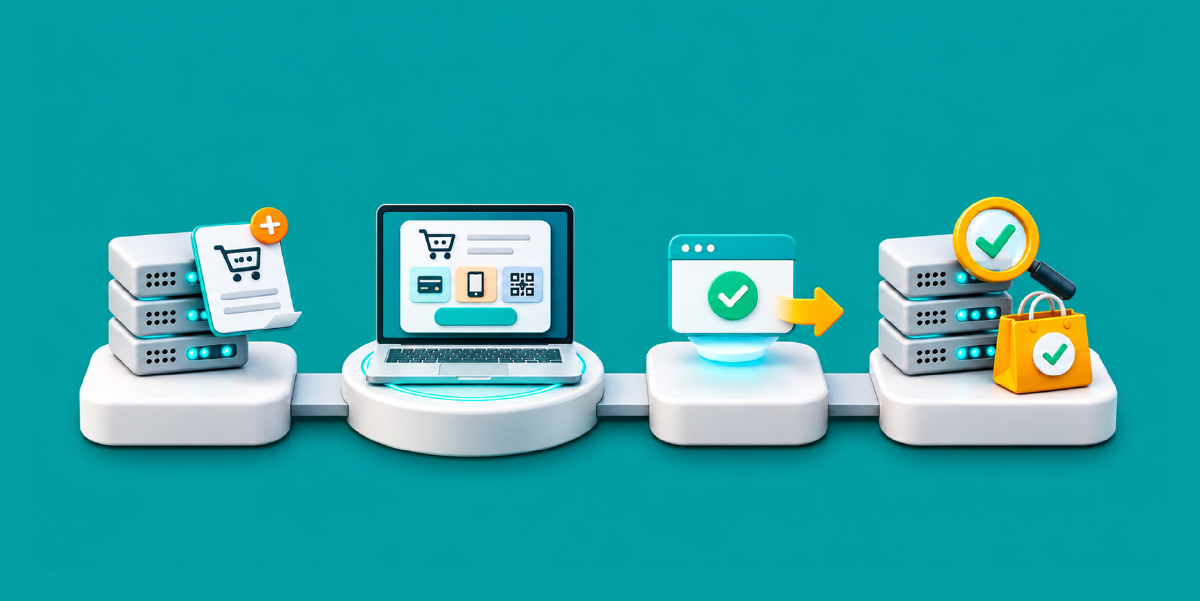
Hubtel Developer Guide: Adding Mobile Money Checkout to Any Website
This guide shows you how to accept Mobile Money and card payments on any website with the Hubtel Online Checkout API. By the end of it, you will have a website that sends a customer to Hubtel’s hosted checkout, receives the payment result, and confirms the payment on your server before delivering anything.
The pattern has four moves. Your server creates a payment request. Hubtel collects the money on its checkout page. Hubtel tells your server the result. Your server double-checks that result before it marks an order as paid.
This guide is for developers who already build web back ends. The examples use PHP and Node.js, but the steps are the same in any language. Every credential, URL and reference in the examples is a placeholder. Replace them with your own values and keep the secrets on the server.
In this guide
- Before you start
- How the Hubtel checkout flow works
- Steps 1 to 6: credentials, payment request, checkout page, callback, status check and duplicate protection
- Testing your Hubtel integration and going live
- Common Hubtel integration problems and fixes
- Security checklist
- Frequently asked questions
Before you start
You need five things in place before you write any code.
- A verified Hubtel merchant account. Hubtel requires every business that integrates payments to hold a merchant account that has been verified and approved. If you do not have one, you can signup for one.
- An API ID and API Key. Generate them in your Hubtel dashboard. Ask your Hubtel engineer to add the right scopes to the keys, or your requests will be refused.
- Your merchant account number. Hubtel’s docs call it your Collection Account Number. It is required in the checkout request and in the status check URL, so keep it with your keys.
- A public HTTPS address for callbacks. Hubtel must be able to reach your callback URL from the internet, so localhost will not work. For local testing, point the callback at a tunnel or a webhook tester such as ngrok, Webhook Tester or Request Catcher, as Hubtel suggests.
- A static server IP, ideally. Hubtel asks merchants to have a static IP whitelisted before they call its status check endpoint, so ask your Hubtel engineer to whitelist your server’s outbound IP early. Shared hosts often change IPs, so confirm yours is stable. Hubtel allows up to four IP addresses per service, and requests from any other address get a 403 error or time out.
All calls to Hubtel must come from your server. Your API Key must never appear in browser code, a mobile app bundle or a public repository.
The online checkout accepts Mobile Money and card payments, and Hubtel’s documentation also lists wallets (Hubtel and G-Money), GhQR and cash or cheque. You do not build any payment screens yourself, because Hubtel hosts the checkout page.
Hubtel does not provide a sandbox or test environment. Every test you run is a real payment against your live account, which changes how you plan your testing. The “Testing and going live” section below covers how to work around that safely.
How the Hubtel checkout flow works
Your server does the work that matters. It creates the request, receives the result, and confirms that result with Hubtel before it delivers anything.
The full sequence runs like this.
- A customer chooses to pay on your site.
- Your server creates a pending payment row and calls Hubtel to start the payment.
- Hubtel returns a checkout URL.
- Your server redirects the customer to Hubtel’s checkout page.
- The customer pays with Mobile Money, a bank card, a wallet or GhQR.
- Hubtel posts the result to your callback URL.
- Hubtel returns the customer to your return URL.
- Your server runs a status check against Hubtel.
- Your server marks the payment paid and delivers the order.
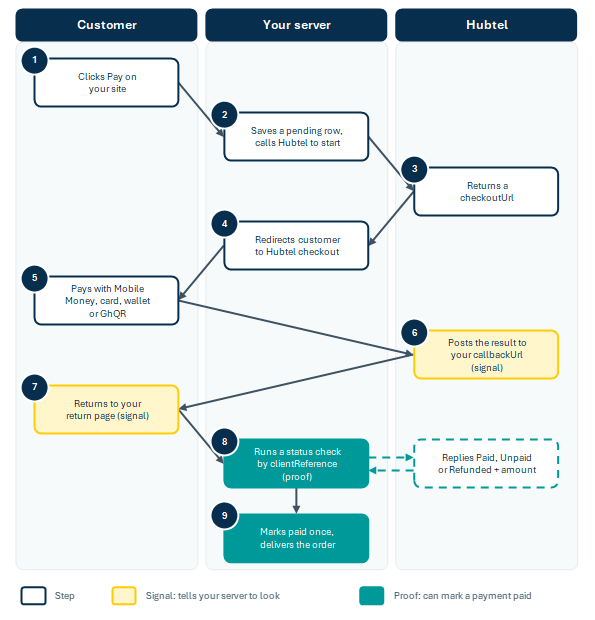
Figure 1. The Hubtel checkout flow in nine steps. The callback and the return page are signals; only the status check and the paid update can mark a payment as paid.
Steps 6 and 7 are signals that tell your server to look. Steps 8 and 9 are the proof, and only they can mark a payment as paid. Hubtel describes a checkout invoice as pending, completed or cancelled.
The next six sections build each step in order, with PHP and Node.js code for every one.
Step 1. Keep your credentials safe
Hubtel authenticates every request with HTTP Basic Auth. You Base64-encode APIID:APIKey and send it in the Authorization header.
Store the values in environment variables or a config file kept outside your public web folder. Never put them in a database column that a plugin can export, in front-end JavaScript, or in version control.
// config.php  (keep this outside the public web root)
return [
     'api_id'      => getenv('HUBTEL_API_ID'),
     'api_key'     => getenv('HUBTEL_API_KEY'),
     'merchant_no' => getenv('HUBTEL_MERCHANT_ACCOUNT'),
     'callback_token' => getenv('HUBTEL_CALLBACK_TOKEN'),   // a long random string
     'base_url'    => rtrim((string) getenv('APP_BASE_URL'), '/'),  // e.g. https://shop.example.com
];

function hubtel_auth_header(array $cfg): string {
     return 'Basic ' . base64_encode($cfg['api_id'] . ':' . $cfg['api_key']);
}
The same idea in Node.js:
// config.js
export const cfg = {
   apiId: process.env.HUBTEL_API_ID,
   apiKey: process.env.HUBTEL_API_KEY,
   merchantNo: process.env.HUBTEL_MERCHANT_ACCOUNT,
   callbackToken: process.env.HUBTEL_CALLBACK_TOKEN,   // a long random string
   baseUrl: (process.env.APP_BASE_URL || '').replace(/\/$/, ''),
};

export const authHeader =
   'Basic ' + Buffer.from(`${cfg.apiId}:${cfg.apiKey}`).toString('base64');
Do not write the Authorization header to your logs. If a key ever shows up in a log, a screenshot or a chat, generate a new one in the dashboard and delete the old one.
Step 2. Create a payment request
You start a payment by sending one POST request from your server to https://payproxyapi.hubtel.com/items/initiate. Use exactly this host. Sending the same body to a different Hubtel host, or with differently named fields, can fail without a clear error message.
| Field | Type | Required | What to send |
| totalAmount | number | Yes | The amount in GHS, calculated on your server, with no more than two decimal places |
| description | string | Yes | A short line the customer sees, such as “Order 123”. Special characters are not accepted |
| callbackUrl | string | Yes | Public HTTPS URL on your server that receives the final result |
| returnUrl | string | Yes | Page the customer lands on after paying |
| cancellationUrl | string | Yes | Page the customer lands on if they cancel |
| clientReference | string | Yes | Your unique reference, 32 characters at most |
| merchantAccountNumber | string | Yes | Your Collection Account Number |
| payeeName, payeeMobileNumber, payeeEmail | string | No | Customer details, if you want them on the invoice |
Three rules save you from most payment bugs.
- Always work out the amount on the server. Look up the price in your own database. Never trust an amount sent from the browser.
- Create the payment record first. Insert a row with status pending and your clientReference, then call Hubtel. A callback can then always find its row.
- Use a new clientReference for every attempt. One order can have several attempts if a customer cancels and tries again. Link each attempt to the order in your table.
Here is the request in PHP:
function hubtel_initiate(array $cfg, array $order): array {
     $payload = [
         'totalAmount'           => round($order['amount'], 2),
         'description'           => 'Order ' . $order['id'],
         'callbackUrl'           => $cfg['base_url'] . '/hubtel/callback.php?token=' . $cfg['callback_token'],
         'returnUrl'             => $cfg['base_url'] . '/payment/return.php?ref=' . $order['client_reference'],
         'cancellationUrl'       => $cfg['base_url'] . '/payment/cancelled.php?ref=' . $order['client_reference'],
         'merchantAccountNumber' => $cfg['merchant_no'],
         'clientReference'       => $order['client_reference'],   // unique, max 32 characters
     ];

    $ch = curl_init('https://payproxyapi.hubtel.com/items/initiate');
     curl_setopt_array($ch, [
         CURLOPT_POST           => true,
         CURLOPT_POSTFIELDS     => json_encode($payload),
         CURLOPT_RETURNTRANSFER => true,
         CURLOPT_TIMEOUT        => 30,
         CURLOPT_HTTPHEADER     => [
             'Content-Type: application/json',
             'Accept: application/json',
             'Authorization: ' . hubtel_auth_header($cfg),
         ],
     ]);
     $body = curl_exec($ch);
     $http = curl_getinfo($ch, CURLINFO_HTTP_CODE);
     $err  = curl_error($ch);
     curl_close($ch);

    if ($body === false) {
         throw new RuntimeException('Hubtel unreachable: ' . $err);
     }
     $json = json_decode($body, true);
     if ($http !== 200 || ($json['responseCode'] ?? '') !== '0000' || empty($json['data']['checkoutUrl'])) {
         error_log('Hubtel initiate failed: HTTP ' . $http . ' ' . substr($body, 0, 500));
         throw new RuntimeException('Could not start the payment. Please try again.');
     }
     return $json['data'];   // checkoutUrl, checkoutId, clientReference, checkoutDirectUrl
}
And in Node.js:
export async function hubtelInitiate(order) {
   const res = await fetch('https://payproxyapi.hubtel.com/items/initiate', {
     method: 'POST',
     signal: AbortSignal.timeout(30000),   // give up after 30 seconds
     headers: {
       'Content-Type': 'application/json',
       Accept: 'application/json',
       Authorization: authHeader,
     },
     body: JSON.stringify({
       totalAmount: Number(order.amount.toFixed(2)),
       description: `Order ${order.id}`,
       callbackUrl: `${cfg.baseUrl}/hubtel/callback?token=${cfg.callbackToken}`,
       returnUrl: `${cfg.baseUrl}/payment/return?ref=${order.clientReference}`,
       cancellationUrl: `${cfg.baseUrl}/payment/cancelled?ref=${order.clientReference}`,
       merchantAccountNumber: cfg.merchantNo,
       clientReference: order.clientReference,
     }),
   });

  const json = await res.json().catch(() => ({}));
   if (!res.ok || json.responseCode !== '0000' || !json.data?.checkoutUrl) {
     console.error('Hubtel initiate failed', res.status, JSON.stringify(json).slice(0, 500));
     throw new Error('Could not start the payment. Please try again.');
   }
   return json.data;
}
A successful response has responseCode 0000 and a data object. Hubtel’s documented example looks like this:
{
   "responseCode": "0000",
   "status": "Success",
   "data": {
     "checkoutUrl": "https://pay.hubtel.com/>",
     "checkoutId": "",
     "clientReference": "ORD-000123-8F2K",
     "message": "",
     "checkoutDirectUrl": "https://pay.hubtel.com//direct"
   }
}
Save checkoutId against your payment row. Keep your own error message short, because the raw response belongs in your server log and not on the customer’s screen.
Step 3. Send the customer to checkout
Hubtel gives you two ways to show the checkout page, and the response from Step 2 contains the link for each.
| Option | Use this link | How it works |
| Redirect checkout | checkoutUrl | You send the customer to Hubtel’s page, then Hubtel sends them back to your returnUrl |
| Onsite checkout | checkoutDirectUrl | You load Hubtel’s page inside an iframe on your own page |
Redirect checkout is the simplest and works well on phones, so start there. On the Hubtel page the customer enters their mobile number, chooses how to pay, and confirms their identity with a one-time code sent to their phone. Onsite checkout can also use a QR code scanned in the Hubtel app.
To redirect, send an HTTP redirect to checkoutUrl as soon as Step 2 succeeds:
In PHP:
$data = hubtel_initiate($cfg, $order);
save_checkout_id($order['client_reference'], $data['checkoutId']);
header('Location: ' . $data['checkoutUrl'], true, 303);
exit;
In Node.js:
const data = await hubtelInitiate(order); await saveCheckoutId(order.clientReference, data.checkoutId); res.redirect(303, data.checkoutUrl); Using onsite checkout instead
If you would rather keep customers on your own page, load checkoutDirectUrl in an iframe, which is how Hubtel recommends showing onsite checkout. Everything from Step 4 onwards stays the same: the callback still reaches your callbackUrl, your returnUrl still loads when payment ends, and the status check still decides.
<iframe src="<?= htmlspecialchars($data['checkoutDirectUrl']) ?>" title="Hubtel checkout" width="100%" height="720" style="border:0"></iframe>The return page
The return page tells the customer what happened. It must never decide that an order is paid. Anyone can type a return URL into a browser, including one that ends in ?paid=1 or ?status=success, so treat the query string as a hint and nothing more.
On arrival, look up the payment in your own database using the reference. If it is still pending, the callback has not landed yet, so ask Hubtel directly using the status check in Step 5.
// payment/return.php
$ref = preg_replace('/[^A-Za-z0-9_-]/', '', $_GET['ref'] ?? '');
$payment = find_payment_by_reference($ref);          // your database lookup

if (!$payment) { http_response_code(404); exit('Payment not found.'); }

if ($payment['status'] === 'pending') {
     $payment = verify_with_hubtel($payment);         // Step 5
}

switch ($payment['status']) {
     case 'paid':   show_success_page($payment); break;
     case 'cancelled': case 'expired': show_failed_page($payment); break;
     default:       show_waiting_page($payment); // "We are confirming your payment" + auto refresh
}
The cancel page
Show a calm message and a “Try again” button. The button must create a new payment attempt with a new clientReference, then repeat Step 2. Do not reuse the old reference.
Step 4. Receive the callback
When the payment finishes, Hubtel sends a POST request with a JSON body to your callbackUrl. Hubtel’s documented example looks like this, with placeholder values here:
{
   "ResponseCode": "0000",
   "Status": "Success",
   "Data": {
     "CheckoutId": "",
     "SalesInvoiceId": "",
     "ClientReference": "ORD-000123-8F2K",
     "Status": "Success",
     "Amount": 50.0,
     "CustomerPhoneNumber": "233XXXXXXXXX",
     "PaymentDetails": {
       "MobileMoneyNumber": "233XXXXXXXXX",
       "PaymentType": "mobilemoney",
       "Channel": "mtn-gh"
     },
     "Description": "The MTN Mobile Money payment has been approved and processed successfully."
   }
}
Notice that the callback keys start with capital letters, while the Step 2 response uses lower-case keys. Read them exactly as written.
Your callback handler should follow five rules.
- Answer fast. Return HTTP 200 as soon as you have stored the payload, then do any slow work afterwards.
- Keep the raw payload. Save it with a timestamp. It is the first thing you will want when a customer says “I paid”.
- Find the payment by ClientReference. Ignore callbacks that match no payment row.
- Do not trust the callback alone. Anyone who finds your callback URL can send a fake request. Use the callback as a signal to run the status check in Step 5.
- Protect the URL. Add a long random token to your callback URL when you create the request, and reject calls without it. Test that Hubtel keeps the query string on your URL. As an extra layer, you can also allow Hubtel’s callback IP address, 108.129.40.25, on your firewall.
In PHP:
// hubtel/callback.php
$raw = file_get_contents('php://input');
error_log('Hubtel callback: ' . $raw);

if (!hash_equals($cfg['callback_token'], $_GET['token'] ?? '')) {
     http_response_code(403);
     exit;
}

$data    = json_decode($raw, true);
$ref     = $data['Data']['ClientReference'] ?? '';
$payment = find_payment_by_reference($ref);

http_response_code(200);                       // acknowledge first
header('Content-Type: application/json');
echo json_encode(['received' => true]);
if (function_exists('fastcgi_finish_request')) { fastcgi_finish_request(); }

if (!$payment) { exit; }

record_callback($payment['id'], $raw);         // store payload + time
verify_with_hubtel($payment);                  // Step 5 decides paid or failed
In Node.js:
app.post('/hubtel/callback', express.json(), async (req, res) => {
   if (req.query.token !== cfg.callbackToken) return res.sendStatus(403);
   console.log('Hubtel callback', JSON.stringify(req.body));
   res.status(200).json({ received: true });    // acknowledge first

  const ref = req.body?.Data?.ClientReference;
   const payment = await findPaymentByReference(ref);
   if (!payment) return;

  await recordCallback(payment.id, req.body);  // store payload + time
   await verifyWithHubtel(payment);             // Step 5 decides paid or failed
});
Do not assume that only successful payments reach this URL, and do not assume each callback arrives once. Step 6 covers duplicates.
Step 5. Verify the payment with a status check
The status check is what turns “Hubtel says it was paid” into “we confirmed it was paid”. Run it before you give the customer anything, and run it whenever a callback goes missing.
Hubtel is strict about this. If you do not receive the final status of a payment within five minutes, a status check is mandatory. Hubtel also asks you to have your server’s static IP whitelisted before you call the status endpoint.
The check is a GET request keyed on your merchant account number and your clientReference.
The code below uses the form https://api-txnstatus.hubtel.com/transactions/{merchant account number}/status?clientReference={your reference}.
Use your Collection Account Number in the URL. Hubtel returns the result in data.status as Paid, Unpaid or Refunded, with the amount in data.amount. Keep the URL and status values in one config file so a change is a one-line edit.
Whatever the response says, apply three safety rules.
- Only a clearly paid status counts as paid. Anything else stays pending.
- Compare the amount. If Hubtel reports a different amount from the one you stored, do not fulfil the order. Flag it for a person to review.
- Never fail a payment because the check itself failed. A timeout or an error from Hubtel means “try again later”, not “unpaid”.
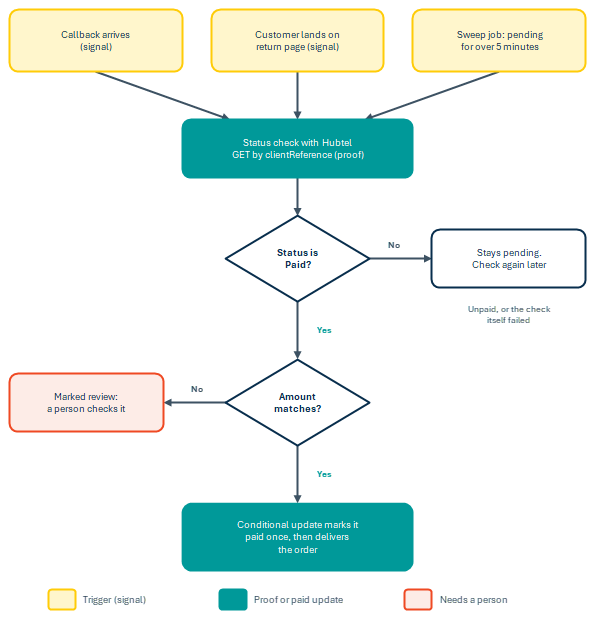
Figure 2. Every trigger ends at the same status check, and only a paid status with a matching amount reaches delivery.
In PHP:
// Put these in config. Hubtel returns Paid, Unpaid or Refunded (compared in lower case below).
const HUBTEL_STATUS_URL    = 'https://api-txnstatus.hubtel.com/transactions/';
const HUBTEL_PAID_STATUSES = ['paid'];

function verify_with_hubtel(array $payment): array {
     global $cfg;
     $url = HUBTEL_STATUS_URL . rawurlencode($cfg['merchant_no'])
          . '/status?clientReference=' . rawurlencode($payment['client_reference']);

    $ch = curl_init($url);
     curl_setopt_array($ch, [
         CURLOPT_RETURNTRANSFER => true,
         CURLOPT_TIMEOUT        => 20,
         CURLOPT_HTTPHEADER     => ['Accept: application/json', 'Authorization: ' . hubtel_auth_header($cfg)],
     ]);
     $body = curl_exec($ch);
     $http = curl_getinfo($ch, CURLINFO_HTTP_CODE);
     curl_close($ch);

    if ($body === false || $http !== 200) {
         return $payment;                         // could not check, so leave it pending
     }

    $json   = json_decode($body, true) ?: [];
     $d      = $json['data'] ?? [];
     $status = strtolower((string) ($d['status'] ?? ''));
     $amount = isset($d['amount']) ? (float) $d['amount'] : null;

    if (in_array($status, HUBTEL_PAID_STATUSES, true)) {
         if ($amount === null || abs($amount - (float) $payment['amount']) > 0.01) {
             return mark_payment($payment['id'], 'review', $body);   // paid, but the amount is wrong
         }
         return mark_payment_paid($payment['id'], $body);            // Step 6
     }
     return $payment;                             // still pending
}
In Node.js:
const HUBTEL_STATUS_URL = 'https://api-txnstatus.hubtel.com/transactions/';
const PAID = ['paid'];   // Hubtel returns Paid, Unpaid or Refunded (compared in lower case)

export async function verifyWithHubtel(payment) {
   const url = `${HUBTEL_STATUS_URL}${encodeURIComponent(cfg.merchantNo)}` +
               `/status?clientReference=${encodeURIComponent(payment.clientReference)}`;

  let res;
   try {
     res = await fetch(url, { headers: { Accept: 'application/json', Authorization: authHeader }, signal: AbortSignal.timeout(20000) });
   } catch { return payment; }                    // timeout or network error: leave it pending
   if (!res.ok) return payment;                   // could not check, so leave it pending

  const json = await res.json().catch(() => ({}));
   const d = json.data ?? {};
   const status = String(d.status ?? '').toLowerCase();
   const amount = d.amount == null ? null : Number(d.amount);

  if (PAID.includes(status)) {
     if (amount === null || Math.abs(amount - Number(payment.amount)) > 0.01) {
       return markPayment(payment.id, 'review', json);   // paid, but the amount is wrong
     }
     return markPaid(payment.id, json);                 // Step 6
   }
   return payment;                                      // still pending
}
Sweep for missed callbacks
Callbacks get lost. Add a small job that runs every five minutes, finds payments that have been pending for more than five minutes, and verifies each one. It should also expire attempts that stay pending for a long time, such as 24 hours, so abandoned checkouts do not sit in your system forever. If a status check later finds that an expired attempt was paid, move it to review rather than ignoring it, because the customer has been charged.
// check_pending.php   (cron: */5 * * * * php /path/to/check_pending.php)
foreach (find_pending_payments_older_than_minutes(5, 200) as $payment) {
     verify_with_hubtel($payment);
     usleep(200000);                          // be gentle with the API
}
expire_pending_payments_older_than_hours(24);
Step 6. Make payments safe to repeat
The same payment can reach you four ways: the callback, a repeat of the callback, the return page and the sweep job. Several may arrive within a second of each other. Your code must mark the payment as paid and deliver the order exactly once, however many times it is told.
Start with a payments table that makes duplicates impossible and keeps an audit trail:
CREATE TABLE payments (
   id                BIGINT UNSIGNED AUTO_INCREMENT PRIMARY KEY,
   order_id          BIGINT UNSIGNED NOT NULL,
   client_reference  VARCHAR(32)   NOT NULL,
   checkout_id       VARCHAR(64)   NULL,
   amount            DECIMAL(10,2) NOT NULL,
   status            ENUM('pending','paid','review','cancelled','expired') NOT NULL DEFAULT 'pending',
   raw_callback      TEXT NULL,
   raw_status_check  TEXT NULL,
   created_at        DATETIME NOT NULL,
   paid_at           DATETIME NULL,
   UNIQUE KEY uq_client_reference (client_reference),
   KEY idx_status_created (status, created_at)
);
The unique key on client_reference stops two payment rows from sharing a reference. Build references that are short enough for Hubtel and hard to guess:
function new_client_reference(int $order_id): string {
     return substr('P' . $order_id . '-' . bin2hex(random_bytes(6)), 0, 32);
}
Then move a payment from pending to paid with one conditional update. Only one request can win it, because the WHERE status = ‘pending’ condition fails for everyone else:
function mark_payment_paid(int $id, string $raw): array {
     $pdo = db();
     $pdo->beginTransaction();

    $st = $pdo->prepare(
         "UPDATE payments SET status = 'paid', paid_at = NOW(), raw_status_check = ?
          WHERE id = ? AND status = 'pending'"
     );
     $st->execute([$raw, $id]);
     $won = ($st->rowCount() === 1);

    if ($won) {
         grant_access_for_payment($id);      // update the order, unlock the download, and so on
     }
     $pdo->commit();

    if ($won) {
         send_receipt_for_payment($id);      // slow work (email, SMS) goes after the commit
     }
     return load_payment($id);
}
If rowCount() is 0, another request already handled this payment, so your function does nothing and returns. That is the whole trick.
Three habits keep the system honest over time.
- Never delete payment rows. Change their status and keep the raw callback and status check text.
- Reconcile every week. Compare your paid rows with the transactions in your Hubtel dashboard and chase any difference.
- Handle refunds and disputes by hand at first. Record them against the same row and add automation only when volume demands it.
Testing your Hubtel integration and going live
Hubtel does not provide a sandbox or test environment, so you cannot rehearse against fake money. Every end-to-end test is a real payment on your live account. That is workable, but it changes the order you test things in.
Test the cheap parts first, without spending anything.
Point your callbackUrl at a tunnel such as ngrok or at a webhook tester, so you can see exactly what Hubtel sends before your own handler ever runs. Replay callbacks against your own endpoint with curl to exercise your token check, your duplicate handling and your database writes. None of that costs a pesewa, and it covers most of the logic that goes wrong.
Then test the real path with the smallest amount your account allows. Use your own Mobile Money number, keep a note of each clientReference, and expect to do several runs. Budget a small amount for this and treat it as part of the build.
Because there is no test environment, be particularly careful with two things. Never run load tests against the live endpoint. And make sure your staging site cannot reach the live checkout by accident, which usually means a separate set of environment variables and a guard that refuses to start a payment when the environment is not production.
Work through every row of this table before launch.
| Scenario | What you should see |
| Normal payment, callback arrives | Row becomes paid once, order is delivered once, return page shows success |
| Normal payment, callback is blocked | The return page or the five-minute sweep verifies it and the row becomes paid |
| Customer cancels | Cancel page appears, no delivery, “Try again” creates a new clientReference |
| Same callback sent twice | No second delivery, no second receipt |
| Callback without your token | HTTP 403 and nothing changes |
| Return URL edited to add ?paid=1 | Page still shows the real status from your database |
| Stored amount differs from Hubtel’s amount | Row becomes review and nothing is delivered |
You can replay a callback yourself with curl. Because your handler verifies with Hubtel before marking anything paid, a made-up payload like this one must not mark a payment as paid:
curl -X POST "https://shop.example.com/hubtel/callback.php?token=YOUR_TOKEN" \
   -H "Content-Type: application/json" \
   -d '{"ResponseCode":"0000","Status":"Success","Data":{"ClientReference":"P123-9f3a1b2c4d5e","Status":"Success","Amount":50.0}}'
Before you switch real customers on, tick off this list.
- Your whole site runs on HTTPS with a valid certificate
- Live API ID and API Key sit in environment variables, not in your code or repository
- The callback URL is public and carries your secret token
- Your server’s static IP is whitelisted with Hubtel for the status check
- The five-minute sweep job is installed and has run at least once
- Logs are on and contain no keys or Authorization headers
- Return and cancel pages are excluded from page caching, so they show live status
- Staging cannot start a live payment
- Your team knows how to find a payment by clientReference and what to do with a review row
Common Hubtel integration problems and fixes
Most integration problems fall into a handful of patterns. Check this table first, then read your own server log for the HTTP code and body Hubtel returned.
| Symptom | Likely cause | Fix |
| No checkoutUrl comes back | Wrong host, wrong field names, a missing required field, or keys without scopes | Use the exact host and field names from Step 2, and ask your Hubtel engineer to confirm the key scopes |
| HTTP 401 or 403 on the request | Malformed Basic Auth header, such as swapped ID and Key or a stray newline | Rebuild the header and test it with a tiny script |
| Customer paid but no callback arrives | A firewall or security plugin blocks outside POST requests, or your URL redirects and the POST is lost | Test with a webhook tester, allow the callback path, use the final canonical URL, and rely on the sweep |
| Status check fails or returns an error | Your IP is not whitelisted, or your host changed IP | Send Hubtel your real outbound IP, and use a host with a static one |
| Order delivered twice | The paid transition is not atomic | Use the conditional update from Step 6 |
| Reference rejected | Longer than 32 characters, or reused | Generate a fresh, short reference per attempt |
| Customer sees success, staff see pending | The return page trusts the query string, or a cache served an old copy | Read status from your database and exclude the page from caching |
| Amount mismatch by a few pesewas | Floating point rounding, or a fee added after the request | Store the amount you sent as DECIMAL(10,2) and compare with a 0.01 tolerance |
| No callbacks while developing | localhost is not reachable from the internet | Use a tunnel such as ngrok |
The redirect row is easy to miss. Many servers answer a request to an http:// or www. address with a redirect, and clients usually turn the redirected POST into a GET with no body. Put the final, canonical address in callbackUrl.
If a payment is debited but never reaches you, that is a separate process on Hubtel’s side rather than an integration fault. See what happens when a Mobile Money payment fails or is reversed.
When you contact Hubtel support, send the clientReference, the checkoutId, the approximate time, and the HTTP response you received. Never send your API Key.
Security checklist
Payment code deserves a slower, more careful review than the rest of your site. Check each of these before you launch.
- API ID and API Key live only on the server, and you rotate them if they ever leak
- The amount always comes from your database, never from the browser
- Nothing is delivered until a status check confirms the payment and the amount
- The callback URL carries a secret token, and the callback is treated as a signal and never as proof
- The return URL’s query string is never trusted
- The move from pending to paid is one conditional update, so duplicates do nothing
- Every page and endpoint involved runs over HTTPS
- The endpoint that starts a payment is rate limited, so bots cannot create thousands of attempts
- Customer phone numbers are personal data, so you store only what you need and limit who can read the payments table
Wrap-up
A reliable Hubtel checkout comes down to one habit. Never believe a single message. Your server creates the request, Hubtel takes the money, and your server confirms the result itself before it delivers anything. A sweep job covers the callbacks that never arrive, and a conditional update covers the ones that arrive twice.
If you are building on WooCommerce or Shopify rather than a custom back end, the setup guide for Ghanaian online stores covers those plugins instead. If you are still choosing a gateway, see how Hubtel compares to other Ghana payment gateways.
Hubtel updates its documentation from time to time, so compare the field names in this guide with Hubtel’s own pages before you deploy.
Get your API keys
If you already have a verified Hubtel merchant account, generate your API ID and API Key in BackOffice, then ask your Hubtel engineer to confirm the key scopes and whitelist your server’s outbound IP for the status check.
If you are evaluating Hubtel before you build, sign up as a Hubtel merchant at business.hubtel.com. Approval and verification come first, and you can be taking live payments through the hosted checkout once they are done.
Once your merchant account is approved, you can access the Hubtel Developers Guide for more integration options.
Frequently asked questions
How do I add Mobile Money checkout to my website with Hubtel?
Your server sends a POST request to Hubtel’s checkout endpoint with the amount, a unique client reference and your callback, return and cancellation URLs. Hubtel returns a checkout URL, you redirect the customer to it, and Hubtel hosts the payment page. You do not build any payment screens yourself. When the payment finishes, Hubtel posts the result to your callback URL and your server confirms it with a status check before marking the order paid.
What is the Hubtel Online Checkout API endpoint?
Payments start with a POST request to https://payproxyapi.hubtel.com/items/initiate, authenticated with HTTP Basic Auth using your API ID and API Key. A successful response has responseCode 0000 and returns a checkoutUrl for redirect checkout and a checkoutDirectUrl for onsite checkout. The full request is in Step 2 of this guide.
Does Hubtel have a sandbox or test environment?
No. Hubtel does not provide a sandbox, so every test is a real payment against your live merchant account. Test your callback handling and duplicate protection locally with a tunnel such as ngrok and replayed payloads, which costs nothing, then run a small number of real low-value payments to confirm the full path before launch.
What programming languages can I use with the Hubtel API?
Any language that can send an HTTPS request. The Hubtel checkout API is a standard REST API using HTTP Basic Auth, so PHP, Node.js, Python, Java, Go, Ruby and C# all work the same way. This guide shows PHP and Node.js examples.
How does Hubtel authenticate API requests?
With HTTP Basic Auth. You Base64-encode your API ID and API Key separated by a colon and send the result in the Authorization header. Both values must stay on your server and never appear in browser code, a mobile app bundle or a public repository.
Do I need to verify a Hubtel payment after receiving the callback?
Yes. Treat the callback as a signal rather than proof, because anyone who finds your callback URL can send a fake request. Run a status check against Hubtel keyed on your client reference, compare the returned amount with the amount you stored, and only then mark the payment paid. Hubtel requires a status check if you have not received a final status within five minutes.
Why is my Hubtel callback not arriving?
The most common causes are a firewall or security plugin blocking inbound POST requests, a redirect on your callback URL that converts the POST to a GET and drops the body, or a callback URL pointing at localhost, which Hubtel cannot reach. Use the final canonical HTTPS address, test with a webhook tester, and run a sweep job every five minutes so missed callbacks are caught by a status check.
Does Hubtel support card payments as well as Mobile Money?
Yes. Hubtel’s hosted checkout accepts Mobile Money and card payments, and its documentation also lists wallets (Hubtel and G-Money), GhQR and cash or cheque. All of them are handled on the same checkout page, so no extra integration work is needed for each payment type.





Related
How Ghana's largest power distributor went from collecting less than 22% of its revenue potential to processing GHS 51 billion through a single platform
June 19, 2026| 10-minute read

From zero to GHS 162B: how a pan-African betting company built its entire Ghana payment operation on Hubtel
June 18, 2026| 8-minute read

How Hubtel helped Pizzaman Chickenman turn 90 branches into a single, connected payment operation processing GHS 107M a year
June 16, 2026| 7-minute read
